
Secure Remote Access for Healthcare: A Compliance Guide
This guide outlines how to achieve secure remote access for healthcare by balancing strict regulatory compliance with high-performance clinical workflows. It provides a practical implementation framework and highlights how AnyViewer protects sensitive patient data.

By Ellie / Updated on July 27, 2026


Healthcare institutions must provide reliable access to EHR/EMR systems while strictly meeting HIPAA, GDPR, and HITECH mandates. Since traditional VPNs often leave security gaps, specialized solutions are required. This guide explores how to implement secure remote access for healthcare, utilizing encryption, granular control, and audit trails to keep infrastructure compliant, performant, and protected.
Why Healthcare Facilities Need Specialized Remote Access Solutions
The shift toward telehealth and remote administration has expanded the attack surface. Standard remote desktop software lacks the granular control required for medical environments.
1. HIPAA and Regulatory Compliance
Every remote connection must be logged, monitored, and encrypted. A professional solution provides automated audit logs that record who accessed what data and for how long, simplifying the reporting process during mandatory security audits.
2. Protecting ePHI (Electronic Protected Health Information)
Secure remote access for healthcare solutions moves the data workload to the center, transmitting only visual data to the endpoint. This prevents patient data from being physically downloaded or cached on local devices, which is critical if a doctor's personal device is lost or stolen.
3. Granular Access Control
Medical teams have diverse needs. A surgeon needs access to high-resolution imaging, while an administrative assistant only needs billing software. RBAC (Role-Based Access Control) ensures users have access only to the systems necessary for their specific job functions.
Recommended Solution: AnyViewer for Healthcare IT
For healthcare organizations seeking a balance between high performance and ease of deployment, AnyViewer provides a streamlined approach.
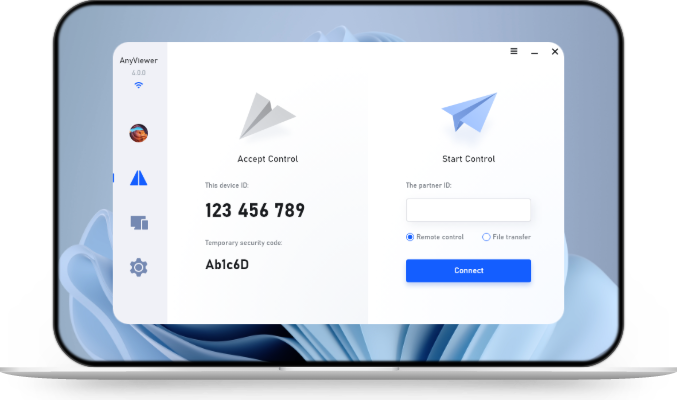
AnyViewer is designed for efficiency, offering reliable connections for remote desktop tasks. It allows IT teams to manage internal medical systems and workstations across multiple departments with ease. By utilizing AnyViewer for IT support for healthcare, hospitals can ensure that their remote support operations remain fast, responsive, and secure. Its intuitive interface reduces the learning curve for staff, while its robust connection stability supports critical clinical workflows without downtime.
Key Requirements for Healthcare Remote Access Solutions
When selecting secure remote access solutions for healthcare, organizations must prioritize tools that combine technical performance with strict compliance capabilities. AnyViewer is specifically engineered to address these critical security requirements:
- Robust Identity Protection: By enforcing Multi-Factor Authentication (MFA), AnyViewer ensures that only authorized personnel can initiate connections, effectively neutralizing the risk of password-based breaches.
- Industry-Standard Encryption: AnyViewer utilizes ECC-256 end-to-end encryption for all data in transit, ensuring that ePHI (electronic Protected Health Information) remains secure and compliant with HIPAA and GDPR standards.
- Transparent Session Recording & Auditing: To meet strict compliance mandates, AnyViewer provides comprehensive session monitoring. IT administrators can rely on detailed connection logs and session recording to verify exactly what actions were taken during a remote session, ensuring full accountability for every access to sensitive medical systems.
- Secure Unattended Access: AnyViewer enables IT teams to perform essential server maintenance and updates securely after hours, ensuring infrastructure remains up-to-date without compromising network security.
- Clinical-Grade Stability: Engineered for low latency, AnyViewer ensures stable, high-fidelity connections. This is vital for clinicians accessing high-resolution imaging or time-sensitive EHR data, ensuring technical tools never disrupt patient care.
Step-by-Step: Implementing Secure Remote Access with AnyViewer
Follow these steps to deploy a secure and compliant remote access environment using AnyViewer:
Step 1. Conduct a Risk Assessment: Identify all endpoints requiring remote access. Map these to user roles in your organization to define necessary privilege levels before configuring AnyViewer accounts.
Step 2. Enforce MFA via AnyViewer: Enable Multi-Factor Authentication directly within the AnyViewer security settings. Disable any accounts without MFA to establish an immediate, mandatory barrier against unauthorized access.
Step 3. Implement Least Privilege: Use the AnyViewer administrative console to assign specific access rights. Restrict users to connecting only to authorized medical workstations or applications required for their specific clinical roles.
Step 4. Audit & Record Regularly: Leverage AnyViewer’s connection logs and session recording features. Conduct weekly reviews of session history to monitor for unusual login times or suspicious geographic activity, ensuring full accountability for every access to sensitive data.
Step 5. Device Hardening: Before authorizing a device to connect via AnyViewer, ensure the endpoint (laptop, tablet) is encrypted and equipped with updated antivirus/EDR software. Maintain a whitelist of approved devices within your AnyViewer management dashboard to further minimize the attack surface.
Conclusion
Implementing a robust framework for secure remote access for healthcare is no longer optional; it is a necessity for patient data protection and regulatory compliance. By prioritizing MFA, end-to-end encryption, and comprehensive session auditing, healthcare organizations can modernize their digital infrastructure. Utilizing a tailored solution like AnyViewer ensures that these security standards are met without sacrificing the stability or performance clinicians rely on for daily patient care.



 as a preferred
source on Google
as a preferred
source on Google