
How to Save Money When Working on SEO Campaign [11 Strategies]
Learn how to save money when working on SEO campaigns with 11 practical strategies, including using free SEO tools, optimizing existing content, targeting long-tail keywords, and improving team efficiency with remote collaboration tools.

By Ellie / Updated on May 28, 2026


Running a search engine optimization campaign doesn't mean you have to bleed cash. Many small and medium-sized businesses pour thousands of dollars into agency retainers each month, only to realize they are paying for bloated, automated reports rather than actual results. If you are wondering how to save money when working on SEO campaign initiatives without sacrificing your rankings, you are in the right place.
By streamlining your workflow, focusing on high-impact tasks, and leveraging the right cost-effective tools, you can slash your marketing spend while driving sustainable organic traffic. Here is exactly how to run an SEO campaign that maximizes your return on investment (ROI) on a shoestring budget.
What Does It Mean to Save Money When Working on an SEO Campaign?
When we talk about saving money on SEO, we don't mean cutting corners, buying cheap, spammy links, or spinning low-quality content. According to industry experts, there is a massive difference between "cheap" SEO and "cost-effective" SEO.
Saving money on an SEO campaign means maximizing resource efficiency. It is about:
- Eliminating redundant, expensive software subscriptions.
- Prioritizing foundational, high-yield tasks over shiny, complex trends.
- Focusing your energy exclusively on strategies that move the needle.
- Utilizing smart remote-work tools to collaborate efficiently without massive overhead costs.
In short, it's about working smarter, being realistic with your goals, and not spending deeper.
How to Save Money When Working on SEO Campaign: 11 Practical Steps
Ready to trim the fat from your marketing budget? Follow this step-by-step framework to execute a highly effective, low-cost SEO strategy.
1. Swap Expensive Enterprise Tools for Free Alternatives
You don't need a $200/month software subscription to find keywords or track your rankings when you are first starting out. Google provides some of the most powerful SEO tools on the market completely free of charge:
- Google Search Console: The ultimate tool for monitoring indexing issues, tracking keyword rankings, and analyzing click-through rates.
- Google Analytics 4 (GA4): Essential for understanding user behavior and tracking conversions.
- Google Keyword Planner: Excellent for finding seed keywords and checking search volumes.
2. Start with a One-Time Technical SEO Audit
Before publishing anything new, you must get your technical house in order. Sluggish load times, broken internal links, and messy site structures will quietly sabotage your entire effort. Use the free version of tools like Screaming Frog to identify low-hanging fruit (like 404 errors or missing meta tags) and fix them yourself.
3. Clean Up and Optimize Existing Content
Creating new content from scratch is expensive. Instead, look at what you already have. Fix your header structures (H1, H2, H3 tags) to ensure they are semantic and easy to read. By updating old, underperforming posts with fresh data, better images, and deeper insights, you can push page-2 content onto page 1 for a fraction of the cost.
4. Master the Art of Internal Linking
Link building is notoriously expensive and time-consuming. While external links are important, you can boost your rankings significantly for free by optimizing your internal link structure. Ensure your high-authority pages link directly to the commercial pages or product listings you want to rank.
5. Write Your Own Guest Posts for Link Building
If you enjoy writing guides, tutorials, and informative pieces, don't pay an agency a massive markup for link building. Pitch high-quality, authentic websites with real traffic in your niche and offer to write guest blogs for them. Writing just one blog a week can net you four high-value backlinks a month for free.
6. Leverage Remote Collaboration Tools to Reduce Overhead
If you are managing a remote SEO team, hiring freelancers, or working with external consultants, communication bottlenecks and duplicate software licenses can drain your budget fast. Time spent explaining technical layout issues via endless email threads is money wasted, and buying individual tool accounts for every contractor is financially unsustainable.
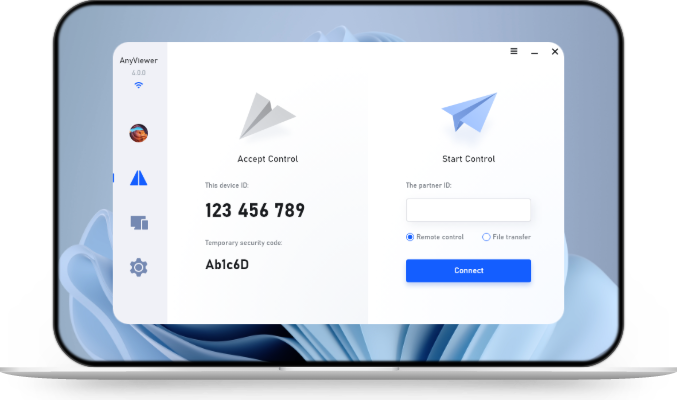
To slash both your timeline and your software expenses, integrate AnyViewer, a secure, high-speed remote desktop software, into your workflow.
- Drastically Lower Time and Financial Costs: Instead of losing hours trying to explain a complex CMS bug or a server rendering issue over chat, your technical lead can instantly access a team member's remote computer via AnyViewer to diagnose and fix the issue in real time. This eliminates communication friction, cuts down project turnaround times, and saves hundreds of dollars in wasted billable hours.
- Maximize ROI on Expensive SEO Software: Top-tier SEO enterprise tools, premium design suites, and specialized indexing software often carry hefty per-user license fees. With AnyViewer, your remote team members can securely log into a centralized local workstation to share access to these expensive applications. This allows multiple collaborators to utilize your core software investments without forcing you to buy individual, high-cost subscriptions for every temporary freelancer.
By keeping your execution fast and your software overhead low, AnyViewer ensures your campaign moves forward smoothly without costly downtime or budget bloat.
7. Optimize for Long-Tail Keywords
Competing for high-volume, highly competitive head terms requires deep pockets. Instead, target long-tail keywords, longer, more specific phrases that users search for when they are closer to a buying decision.
8. Focus on Local SEO
If you serve a specific geographic area, local SEO is your best friend. Setting up and optimizing a Google Business Profile costs absolutely nothing. Claim your profile, add accurate business hours, upload high-quality photos, and encourage satisfied customers to leave reviews.
9. Take a "Slow and Steady" Approach
Many businesses fall into the trap of wanting to rank first overnight. This desperation leads them to buy expensive packages that promise quick wins. By breaking your strategy down, properly optimizing your website one month, and building content the next, you create a manageable, affordable routine.
10. Avoid Shady $99/Month Retainers
If an agency offers a rock-bottom rate or "guarantees" page-one results, walk away. These packages are usually stuffed with generic tactics, spammy backlinks, and automated scripts that can easily lead to manual penalties from Google, costing you far more money to fix in the long run.
11. Learn the Basics Yourself
The ultimate way to save money is to invest a little time into self-education. Free resources like GoDaddy's SEO blog, Ahrefs' blog, and Google's Search Central documentation can teach you everything you need to know to run a successful baseline campaign.
The Benefits of a Cost-Conscious SEO Campaign
Adopting a lean, slow-and-steady approach to your SEO strategy yields several massive advantages for your business:
- Higher ROI: When your upfront investment is lower, every click, lead, and sale generated from organic search yields a much higher profit margin.
- Agility and Flexibility: Massive budgets often lead to rigid, slow-moving campaigns. A cost-conscious campaign allows you to pivot quickly based on algorithm updates or market shifts.
- Focus on Fundamentals: Limited funds force you to master the basics, technical health, exceptional content, and clean user experience, which are the exact elements Google values most.
- Long-Term Sustainability: High-spend campaigns are often unsustainable for small-to-medium enterprises (SMEs). A budget-friendly framework ensures you can maintain your SEO efforts for years.
Conclusion
Learning how to save money when working on SEO campaign budgets isn't about compromising on quality; it is about eliminating inefficiencies. By substituting enterprise-level tools with free alternatives, focusing heavily on foundational content optimization, and using smart tools like AnyViewer to keep your remote execution team fast and nimble, you can compete with industry giants without matching their massive budgets. Stay consistent, monitor your analytics, and let your data guide your next move.



 as a preferred
source on Google
as a preferred
source on Google